
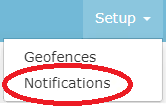
The Notification Setup page will appear, with all of your existing notification triggers, addresses and delivery windows. If you have none, this page will be blank.
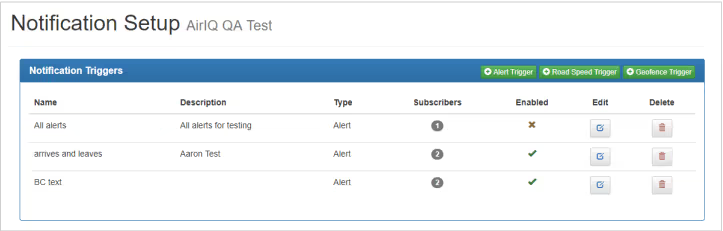
Note: You need to have users in your address book to utilize notifications. The address book is located just below the Notification Triggers box shown above.
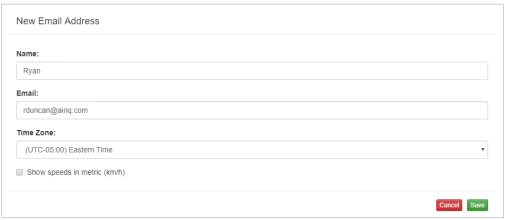
Add subscriber(s) to the address book to receive alerts.

Select the trigger type that you require from the top right-hand side of the Notification Triggers box (shown above).

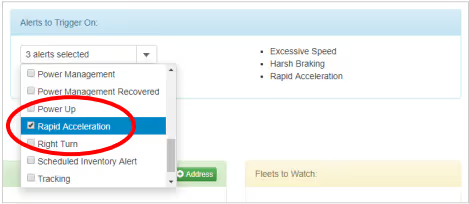
Give your trigger a name, description (optional), and the events that alerts will trigger on.
To set up a text notification(via SMS), get your carrier’s e-mail to SMS address format and add your phone number, then put the full address in the email field as shown above.
The most common Email to SMS address formats are below:
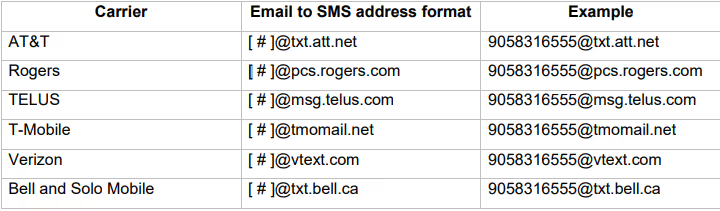
Putting 5551234567@txt.att.net in the Email field in the address book would send an alert upon the trigger to (555) 123-4567 as long as they are an AT&T customer.
If you do not receive SMS alerts, confirm you have formatted the email correctly, and if so, contact your carrier.